

Why are you still waiting for a thousand-dollar software budget before launching your career? If you feel paralyzed by technical intimidation or the fear that your DIY work looks amateurish, you aren't alone. Most emerging talent believes that professional results require expensive subscriptions; however, the reality is far more empowering. You can master how to edit a demo reel for free using tools that meet the rigorous 2026 standards of today's casting directors.
We understand the pressure to showcase your range while navigating confusing industry standards regarding length and format. This guide provides the clarity you need to move past the noise of social media and into the realm of professional business development. You'll learn which free tools are actually professional-grade, how to prioritize your best clips, and the exact steps to create a polished, 2-minute reel that earns you a seat at the table. It's time to stop letting technical hurdles gatekeep your success and start submitting your work with absolute confidence.
Key Takeaways
- Learn how to edit a demo reel for free using professional-grade desktop software that avoids intrusive watermarks and hidden export fees.
- Master the "10-second hook" strategy to capture a casting director's attention immediately before they move on to the next candidate.
- Implement a disciplined two-phase workflow—logging and rough cutting—to ensure your best footage is organized and impactful.
- Aim for a high-energy 60-90 second runtime to meet the refined 2026 industry standards for professional talent portfolios.
- Understand the power of expert curation over simple assembly to bypass the "cold submission" pile and secure legitimate opportunities.
The Professional Standard: Why Your Demo Reel is Your Digital Handshake in 2026
Your demo reel is a curated video montage demonstrating your range, technical skill, and on-camera presence. It acts as your primary digital handshake. If you are learning how to edit a demo reel for free, it's vital to understand that the industry has shifted. In 2026, the volume of digital submissions is higher than ever. Casting directors often spend less than 10 seconds deciding if they'll watch your full reel or move to the next candidate. This brief window means your presentation must be immediate, professional, and entirely focused on your unique value.
We are seeing a strong "Anti-Template" movement among top-tier recruiters. While flashy AI-generated transitions and social media filters are easy to find, authentic, clean edits beat them every time. Industry pros can spot a generic tutorial-style edit from a mile away. Your goal is to let your performance breathe without the distraction of over-processed effects. Before you open any software, define your objective. Are you targeting a specific agency submission that requires a niche look, or are you building a general portfolio update to showcase your overall versatility?
Curation vs. Collection: The Psychology of Selection
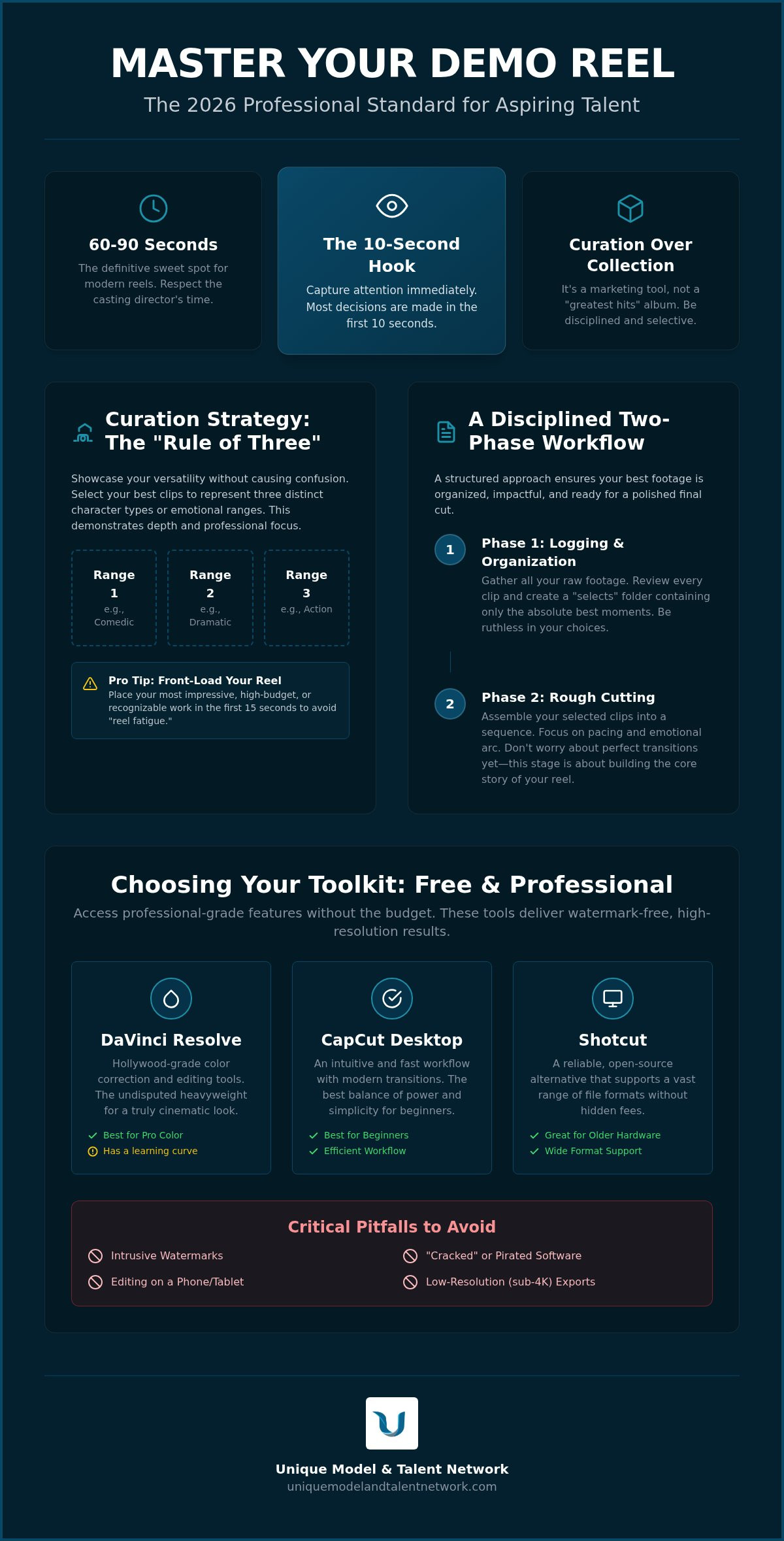
Your reel is not a "greatest hits" album of every job you've ever booked. It's a focused marketing tool designed to prove you can do the job you're currently auditioning for. We recommend the "Rule of Three." Select clips that showcase three distinct types or emotional ranges. This demonstrates depth without causing confusion. You must be disciplined enough to leave out the fluff. Including student films or class exercises can sometimes hurt your credibility if the production quality doesn't match professional standards. If a clip doesn't elevate your status, it doesn't belong in the cut.
The 2-Minute Maximum: Understanding Industry Attention Spans
The days of the three-minute epic are over. For modern talent reels, 60-90 seconds is the definitive sweet spot. You must use a "Front-Loading" strategy by putting your most impressive, high-budget, or recognizable work in the first 15 seconds. If you don't hook them early, they won't stay for the finale. This approach helps you avoid "reel fatigue," which is the mental disengagement a viewer experiences when a reel feels repetitive or lacks a clear narrative pace. When you master how to edit a demo reel for free with this level of strategic intent, you position yourself as a professional who respects the time of the people hiring you.
Choosing Your Toolkit: The Best Free Video Editing Software for 2026
Selecting your editing environment is the first critical decision in your creative process. You don't need a massive budget to access high-end features, but you must be wary of "free" tools that hold your work hostage. Many apps lure you in only to demand payment for high-definition exports or slap an intrusive watermark across your face. When you're figuring out how to edit a demo reel for free, professional presentation is non-negotiable. A watermark tells a casting director that you aren't yet invested in your own professional business development.
Precision matters. A mouse and keyboard allow for frame-accurate cuts that a touchscreen simply can't match. In 2026, 4K export capabilities are essential. Casting directors view submissions on high-resolution screens; a pixelated 720p export looks like an amateur mistake. Security is another major factor. Avoid "cracked" versions of paid software at all costs. These files often contain malware that compromises your professional data and creative assets. Stick to legitimate, vetted software to protect your career and your hardware.
Desktop Powerhouses: Professional Grade for Zero Dollars
For those serious about their craft, desktop software offers the depth required for a high-impact reel. DaVinci Resolve is the heavyweight champion here. The free version offers professional-grade color correction and editing tools used on Hollywood features. It has a learning curve, but the results are unmatched. If you need speed and intuitive controls, CapCut Desktop is the best balance for beginners. It offers modern transitions and efficient workflows without the complexity of traditional NLEs. For talent using older hardware, Shotcut is a reliable open-source alternative that supports a vast range of file formats without hidden fees.
Once you've selected your tool and finished your first draft, getting an expert eye on your work is a smart move. A Portfolio & Reel Review can help you identify if your technical choices align with current industry expectations before you hit submit.
Mobile-First Editing for Quick Turnarounds
Mobile apps have improved significantly, but they serve a specific purpose. iMovie remains a clean, cinematic staple for Apple users. It's stable and integrates perfectly with your iPhone footage. Another standout is VN Video Editor, which provides a powerful, watermark-free experience for both Android and iPhone. It offers multi-track editing that feels surprisingly close to a desktop environment. Use mobile editing for social media "mini-reels" or quick self-tape montages. For your primary industry handshake, however, the precision of a desktop edit is always the superior choice.
The Insider’s Edit: Curation Strategies That Capture Casting Directors
Understanding how to edit a demo reel for free is only half the battle. The real work lies in the psychology of the edit. You aren't just cutting clips; you are building a strategic narrative that proves you're a professional. Casting directors view hundreds of reels weekly. They don't have time for slow builds or technical explanations. Your edit must speak for itself immediately. This requires a shift from thinking like a performer to thinking like a recruiter who is looking for reasons to say "yes."
Start with your "Hook." This is the opening shot that proves you belong in the room. It should be your most recognizable work or your most compelling performance. If your first shot is a wide-angle scene where the viewer can't see your eyes, you've already lost them. You must also avoid the "No-Dialogue" trap. Models need dynamic movement to show they understand the camera's relationship with their body, while actors require clear, crisp audio to evaluate their delivery. If the audio is muffled or distant, the performance becomes irrelevant. Use subtle text overlays in a clean, sans-serif font to identify brands or project titles. This provides context without cluttering the frame or distracting from your face.
Consistency in quality is your greatest ally. One low-resolution, grainy clip from five years ago can ruin the professional feel of five high-definition scenes. It's always better to have a shorter, high-quality reel than a longer one that showcases technical decline. When you master how to edit a demo reel for free, you learn that the "delete" key is your most powerful tool for maintaining professional standards.
Showcasing Range Without Losing Focus
Transitioning between a dramatic scene and a comedic one requires finesse. Don't just slap them together; use a brief beat of black or a clean cut to reset the viewer's emotional state. If you have a wealth of footage, consider a "Commercial vs. Narrative" split. Agencies often prefer separate reels so they can send exactly what a specific client needs. You can maintain a sense of narrative flow by matching your eye-line continuity across different clips, which keeps the viewer’s focus locked on your performance rather than the technical jump.
The Essential 'B-Roll' for Models
Models often lack narrative scenes, but you can still create a high-impact edit. Use "digitals" and movement clips to fill gaps between professional bookings. Show how you move, how you react to light, and how you take direction. You should aim to showcase your personality in five seconds or less through a quick smile or a candid reaction. This approach is a core part of the ultimate guide to building an acting portfolio, where we discuss how to integrate these assets into a cohesive, professional brand that gets noticed by top-tier agencies.
The Step-by-Step Workflow: How to Edit Your Reel Like a Pro
Success in the edit suite depends on your discipline, not just your software. Mastering how to edit a demo reel for free requires a structured approach that moves from broad strokes to minute details. By following a professional workflow, you ensure that no high-impact moment is lost to technical clutter or poor organization. This process transforms a pile of random clips into a cohesive marketing asset that commands respect.
- Phase 1: The Logging Session. Don't start cutting yet. Watch every second of your raw footage and mark the "gold" moments. Be ruthless. If a clip doesn't showcase you at your absolute best, it shouldn't make it to your timeline.
- Phase 2: The Rough Cut. Lay out your selected clips in a logical order. Focus on the narrative flow and the "Front-Loading" strategy we discussed earlier. Don't worry about transitions or color grading at this stage; just ensure the energy builds correctly.
- Phase 3: The Fine Cut. This is where you tighten every frame. Ensure your audio levels are normalized so the viewer doesn't have to adjust their volume between clips. Every cut should feel intentional and snappy.
- Phase 4: Branding and Export. Add your professional title cards and choose the correct export settings. In 2026, you should aim for a high-bitrate 4K H.264 or H.265 file to ensure compatibility across all major platforms.
Once you've organized your timeline, you might want to join one of our Live Industry Workshops to see how professional editors refine their pacing for maximum impact.
Audio and Pacing: The Secret Sauce of Professional Reels
Audio is often the first thing that gives away an amateur edit. You must select "Safe" music by using royalty-free libraries; avoiding copyrighted tracks prevents your reel from being flagged or silenced on YouTube and Vimeo. When leveling your audio, ensure your dialogue is never drowned out by background tracks. A good rule is to keep music 15 to 20 decibels lower than the speaking voice. Finally, apply the "Blink Test." If a clip feels even a second too long, it probably is. Pacing should feel energetic and keep the viewer leaning in rather than checking the progress bar.
Branding Your Reel: Intros, Outros, and Contact Info
Your name and professional "Type" should be visible in the first 3 seconds of the video. Casting directors need to know exactly who they are watching before the first scene even starts. Use a clean, professional font that doesn't distract from the footage. Your Outro is equally vital. It should make it incredibly easy for a casting director to click "Email" or "Call." Include your headshot, your location, and links to the casting websites where your full profile lives. This clear call to action moves you from being a "talent" to being a "hire."
Elevating Your Portfolio: From DIY Edit to Industry-Ready Asset
You've mastered the software. You've organized your clips. You've exported the file. While learning how to edit a demo reel for free is a significant technical milestone, the work doesn't end when you close your editing app. The transition from a finished video file to a professional booking tool requires a shift in perspective. You must now move from the role of a creator to the role of a business developer, ensuring your work actually reaches the decision-makers who can hire you.
Avoid the "Echo Chamber" at all costs. Your friends and family will likely praise your reel because they recognize your hard work and talent. However, their opinions aren't the same as a casting director's. A recruiter looks for specific technical markers, pacing, and "Type" clarity. They're scanning for reasons to trust you with a professional contract. If your reel feels like a passion project rather than a marketing asset, it will likely stay in the "cold submission" pile. Use your new reel as a conversation starter within your professional network rather than a blind attachment in an email.
The entertainment industry moves fast. Treat your reel as a living document that requires quarterly updates. As you complete Monthly Skill-Building Challenges or book new roles, swap out your weakest clips for fresh, higher-quality footage. This commitment to continuous improvement shows agencies that you're an active, working professional who values high standards. A reel that hasn't been updated in a year suggests a stagnant career; a reel that evolves suggests momentum.
Professional Review: The Final Polish
Even the best DIY edits can benefit from an objective, expert eye. A professional portfolio review for actors can identify "red flags" you might have missed, such as minor audio inconsistencies or a "hook" that isn't as strong as you think. Within the Unique Model & Talent Network, you can get direct feedback from casting directors who see thousands of reels. This perspective helps you transform your reel from a simple video file into a strategic asset that bypasses gatekeepers and proves your financial legitimacy as a professional talent.
Next Steps: Beyond the Edit
Once your reel is polished, it's time to put it to work. Join our live industry workshops to practice the specific skills you've showcased on screen and stay ahead of 2026 trends. Consistency is the key to career acceleration. Set a strict schedule for generating fresh footage through our community challenges so your portfolio never feels dated. If you're ready for a professional eye to evaluate your work and help you reach that next level of career security, Join the Unique Model & Talent Network for a Reel Review today. Don't let your hard work sit on a hard drive when it could be opening doors to vetted industry opportunities.
Take Control of Your Professional Narrative
Mastering the technical side of how to edit a demo reel for free is the first step toward career autonomy. By choosing professional-grade tools and implementing a strategic curation workflow, you've moved beyond the amateurish templates that clutter the industry. Your reel is now a focused marketing asset that respects the 10-second attention span of modern casting directors. Remember that this is a living document; it requires high-quality clips, tight pacing, and a relentless focus on your most marketable professional qualities.
Technical execution is only half the battle. To truly stand out in 2026, you need direct access to the experts who make hiring decisions. Our vetted community provides a protective environment where you can refine your craft through monthly skill-building challenges and receive direct feedback from casting directors and photographers. Secure Your Career Path – Join the Unique Model & Talent Network Today to ensure your hard work reaches the right desks and bypasses the cold submission pile. Your talent is ready; now, let's make sure the industry is ready for you.
Frequently Asked Questions
What is the ideal length for a demo reel in 2026?
The current 2026 industry standard for a demo reel is between 60 and 90 seconds. Casting directors prefer this window because it allows them to evaluate your range without experiencing "reel fatigue." If your edit exceeds two minutes, you risk losing their attention before they see your best work.
Can I include student film footage in my professional reel?
You can include student film footage if the production value meets professional standards. If the lighting is poor or the audio is muffled, it will hurt your credibility more than it helps. Always prioritize clips that look like they belong on a major network or a legitimate streaming platform.
Do I need to include music in my demo reel?
Music is essential for setting the tone, but it must never compete with your performance. When you learn how to edit a demo reel for free, you'll find that keeping music 15 to 20 decibels lower than your dialogue is the sweet spot. Stick to royalty-free tracks to avoid copyright strikes on video platforms.
Should I put my headshot at the beginning or the end of the reel?
Place your name and professional "Type" in the first 3 seconds, and include a full contact card at the end. Leading with your headshot ensures the casting director knows exactly who they're watching immediately. The outro should contain your email, location, and links to your professional profiles.
What is the best file format for uploading to casting websites?
The best file format for 2026 casting websites is a high-bitrate 4K H.264 or H.265 MP4 file. These settings provide the best balance between visual clarity and manageable file size. Using these industry-standard exports ensures your reel looks crisp on high-definition casting screens.
How many scenes should be in a 2-minute acting reel?
A 2-minute reel should typically feature 3 to 5 distinct scenes that showcase your emotional range. Don't let any single scene run too long; usually 30 seconds per clip is enough to prove your capability. Focus on the "Rule of Three" to demonstrate depth while keeping the pacing tight.
Is it okay to include a montage of photos if I don't have enough video?
Avoid using a montage of still photos as a substitute for video footage. If you lack professional scenes, use high-quality "digitals" or simple movement clips showing you reacting to the camera. Casting directors need to see how you move and hear how you speak to evaluate your talent properly.
How often should I update my demo reel?
You should update your reel quarterly to ensure it remains a "living document" that reflects your current skill level. Regular updates are a core part of how to edit a demo reel for free effectively. As you complete new challenges or book roles, replace your oldest or weakest footage with your latest work.


