

An Eco Cast audition puts your performance on screen, but the submission process matters too. If you’re asking what an Eco Cast audition is, it’s a remote audition that lets you perform for casting through a live online session or a self-taped submission. For an Eco Cast Live session, enter the audition room 10 minutes before the scheduled start.
It’s understandable to want clear steps before you record or join a live session. Knowing where to enter, what to expect on camera, and when your files are fully submitted helps you focus on the performance instead of second-guessing the process.
This guide explains what an Eco Cast audition is and walks you through the process from invitation to submission: how to prepare, enter the room, record your performance, and confirm your files are ready. You’ll also learn how deadlines work and what to do if a live session is interrupted, so you can approach your audition with clarity.
Key Takeaways
- Confirm the audition before trying to join its Eco Cast Live session, and allow browser access to your camera and microphone.
- Invitation deadlines display in your local time according to your computer or device time-zone settings.
- A 12:00 AM deadline means your files must be submitted before that date begins.
- Wait until your audition files have finished uploading and encoding before proceeding.
- A desktop or laptop computer is recommended for Eco Cast Live; if a session is interrupted, you can rejoin until you choose to end it.
Entering the audition room
- Read the invitation and confirm the audition. Open the Eco Cast invitation and review the session details before joining. You must confirm the audition before entering its Eco Cast Live session. Complete that step first, then use the session access provided for the audition. This connects your audition to the live room, so you’re not left at the invitation stage when the session begins.
- Check the scheduled time on your device. Eco Cast invitation deadlines appear in the local time set by your computer or device. Review the schedule on the device you’ll use for the session, especially if you recently changed its time-zone setting. A laptop set to a different local time, for example, may display a deadline differently from another device.
- Plan to enter 10 minutes early. Actors are advised to enter an Eco Cast Live audition room 10 minutes before the scheduled time. Use those minutes to open the session and address access prompts before the scheduled start. Avoid leaving the first attempt until the final moment. If the browser needs permission or the session takes time to load, an early arrival gives you room to respond.
- Allow browser access to your camera and microphone. Eco Cast Live sessions can start only after you allow camera and microphone access in your browser. When prompted, allow access to both. If you previously blocked it, change the browser’s permissions and return to the room. The session cannot start without these permissions, even if you’ve confirmed the audition.
- Understand what a collaborator recording captures. During a collaborator session recording, only the actor’s and designated reader’s voices are recorded on the take. Focus on the scene and coordinate your performance with the reader. This clarifies whose voices the recorded take captures when another person reads with you.
- Rejoin if a technical interruption occurs. If technical difficulties interrupt an Eco Cast Live session, you can rejoin until you choose to end it. Return to the session rather than treating an interruption as the end of your audition. Once reconnected, continue with the room’s session flow. You control when to end the session, so don’t select that option if you still need to resume.
Submitting the audition
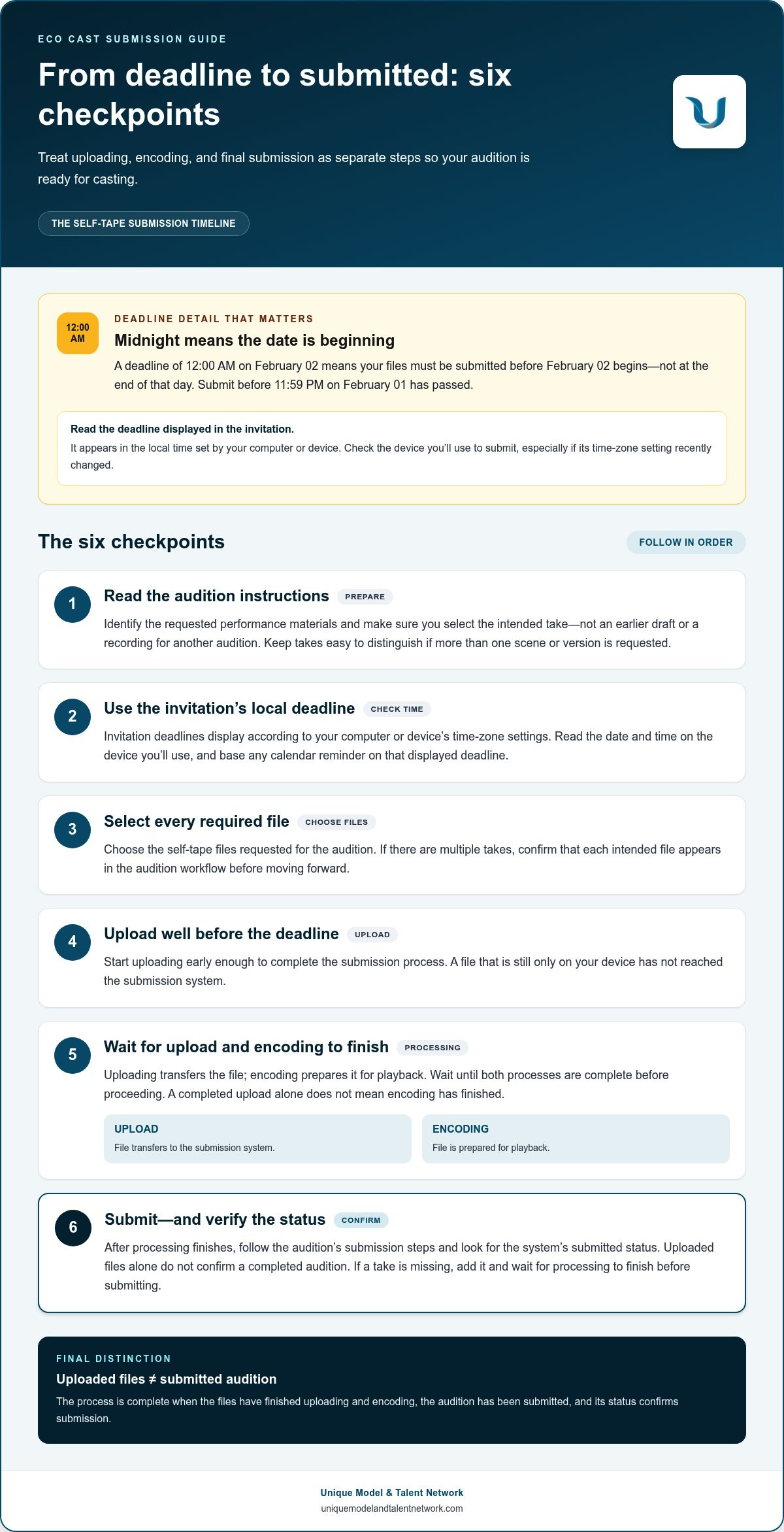
Common submission mistakes include misreading a midnight deadline, uploading files without completing submission, and leaving before encoding finishes. Treat uploading, encoding, and final submission as separate checkpoints to make sure your performance reaches casting on time.
- Read the deadline as a specific date and time. An Eco Cast deadline of 12:00 AM means your self-tape files must be submitted before that date begins. For an audition due at 12:00 AM on February 02, upload and submit the files before 11:59 PM on February 01 has passed. Don’t interpret midnight as the end of February 02.
- Use the invitation’s displayed deadline. Eco Cast invitation deadlines display in your local time, based on your computer or device’s time-zone settings. Read the date and time on the device you’ll use to submit. If you set a calendar reminder, enter the displayed deadline so you don’t accidentally schedule your upload for the wrong day.
- Prepare the required take before uploading. Review the audition instructions and identify the requested performance materials. Keep each take easy to distinguish, especially if the request calls for more than one scene or version. Before choosing files, make sure you’ve selected the intended performance, not an earlier draft or a recording for another audition.
- Upload every required file. Select the self-tape files for the audition and start uploading well before the deadline. A file still on your device hasn’t reached the submission system. If the request includes multiple takes, confirm that every intended file appears in the audition workflow before moving on.
- Wait for uploading and encoding to finish. Wait until your audition files have finished both uploading and encoding before proceeding. Uploading transfers the file; encoding prepares it for playback. Don’t close the audition page or assume the take is ready while either process is underway. A completed upload alone, for example, doesn’t mean encoding has finished.
- Complete the submission and review its status. After processing finishes, follow the audition’s steps to submit the files. Look for the system’s submitted status rather than relying on uploaded files alone. If you notice a missing take before submitting, add it and wait for processing to finish. Checking the final status helps distinguish a saved draft from a completed audition.
What Eco Cast is
An Eco Cast audition is an online casting process for submitting a performance. It can involve a recorded self-tape or an Eco Cast Live session.
An Eco Cast audition isn’t a different way of making a self-tape. A self-tape is a recorded performance; Eco Cast is the audition process for delivering it or participating live.
Eco Cast describes how you audition, not whether the eventual role pays. Check the project’s compensation terms in its casting details. An audition invitation isn’t a job offer.
Casting directors can review submitted audition files for casting. Treat your video as material delivered for that review, and follow the audition’s access and sharing settings.
- Identify the audition format in the invitation. Read the casting instructions to determine whether you’re submitting a self-tape or joining an Eco Cast Live session. A request for recorded scenes, for example, calls for a video submission, while a scheduled live session requires you to enter the online audition room. The format determines your next steps.
- Separate the platform from the performance. Eco Cast names the audition workflow; your take is the acting performance casting evaluates. You can record a self-tape before uploading it, while a live audition takes place during the scheduled session. Knowing the difference helps you prepare for the task rather than treating the platform name as an acting technique.
- Use the casting instructions as your guide. Review the role, scene, and requested materials before recording or joining. If the invitation requests a specific scene, prepare that scene rather than substituting another piece. The project’s instructions establish what casting expects to review, while Eco Cast provides the route for delivering your audition.
- Keep audition access in mind. Submitted files are intended for casting review, not automatically for public posting. Follow the audition’s available permissions and any instructions about collaborators or readers. In a collaborator recording, only the actor’s and designated reader’s voices are recorded on the take, clarifying what the recording captures.
- Distinguish the audition from the booking. An invitation asks you to perform for consideration; it doesn’t confirm you’ve been cast. Compensation relates to the role’s stated terms, not the Eco Cast format. Read the project details to understand the opportunity, then submit the requested performance through its audition workflow.
How do actors receive an Eco Cast audition request?
- Open the invitation and identify who sent it. An Eco Cast audition request arrives as an invitation to audition. If a talent representative forwards it, they may review your files before sending them to casting. As a result, casting might not see the exact files you first sent your representative. Read the sender and any accompanying message before preparing your response.
- Read the role and audition instructions first. Use the invitation to identify the project, role, requested scenes, and submission format. A request for a recorded scene, for example, points you toward a self-tape, while a scheduled live session means preparing for an online audition. Keep the project instructions together so each take matches the requested material.
- Clarify the forwarding path with your representative. If your representative sent the request, follow their instructions for delivering your performance. They may review your files before sending them to casting, so submit the version you want them to assess. Don’t send a rough take if you intend to provide a polished one. Keep your representative’s message and the audition invitation handy.
- Confirm the audition in the platform. You must confirm the audition before joining an Eco Cast Live session. Treat the invitation and confirmation as separate actions: receiving a request doesn’t complete confirmation. Open the audition, review its details, and confirm before trying to enter the live room. This keeps your response aligned with the session access process.
- Record or attend the format requested. Follow the audition’s specified format rather than assuming every request uses the same process. For a self-tape, prepare the requested scenes and submit the files through the audition workflow. For Eco Cast Live, use the scheduled session details. Follow the invitation’s instructions for your performance materials, and don’t substitute unrelated footage or a different scene.
- Track the deadline and submission status. Invitation deadlines display in your local time, according to your computer or device settings. Use the displayed time to plan your response, then confirm that the files finish uploading and encoding before proceeding. A representative’s review may add a step before casting receives your files, so allow time for that handoff instead of waiting until the deadline.
- Keep the invitation and response organized. Save the project details, requested materials, and representative’s instructions together. If you receive several auditions, distinguish each project by its role or scene rather than relying on memory. Before sending files, compare them with the invitation and confirm they match that request. This simple record helps prevent a take for one audition from going to another.
What equipment and setup do you need to record an Eco Cast audition?
- Choose a desktop or laptop for Eco Cast Live. The system recommends using a desktop or laptop for live sessions. Set up on the device you’ll use to join rather than waiting until the scheduled session to switch screens. For a self-tape, follow the audition instructions and choose a device that can record and upload your performance.
- Check your camera and microphone before recording. Eco Cast Live needs browser access to both devices before the session can start. Open your browser settings and make sure the intended camera and microphone are selected. For a self-tape, record a short test and play it back to check that your face and voice are clear.
- Place the camera at a steady, natural angle. Set your device on a stable surface so the frame doesn’t shift during the scene. Check that your face stays visible as you perform the requested action. Rehearse the scene once, for example, and watch to see whether any movement takes you out of frame.
- Choose a quiet recording space. Reduce interruptions by silencing notifications and letting anyone nearby know you’re recording. Listen to a test clip for background sounds such as a fan or traffic. A quiet room keeps attention on the dialogue rather than competing noise.
- Use clear, consistent lighting. Check your image before the take and adjust the light so your face is easy to see. Avoid placing a bright window directly behind you, which can leave your features in shadow. A simple test recording can reveal problems before you perform the full scene.
- Frame the performance to suit the scene. Follow any framing directions in the audition instructions. Leave enough room to perform naturally without drifting out of view. If the scene calls for a close, contained performance, test your position and movement on camera before recording the final take.
- Prepare your recording space and materials. Keep the sides or script within easy reach, but avoid repeatedly looking away from the scene. Remove distracting items from the visible background. For a live collaborator session, position yourself so the camera captures your performance as you work with the designated reader.
- Run a final technical test before the take. Check the camera, microphone, framing, lighting, and sound in one short test. For Eco Cast Live, allow browser permissions before starting. For a self-tape, play back the test file and fix any issues before recording the audition performance.
For focused guidance on preparing for auditions, explore audition-focused industry learning.
Unique Model & Talent Network: The Network Membership
Unique Model & Talent Network’s The Network Membership can help you build skills and industry knowledge beyond a single audition. If you want structured support between casting opportunities, the membership connects you with industry experts and helps you develop your professional approach.
For practical development, Live Industry Workshops offer a chance to learn from industry professionals, while Portfolio & Reel Reviews can help strengthen the materials that represent your work. Monthly Skill-Building Challenges give you focused ways to keep practicing. Choose the option that fits your current goal, whether you’re refining your reel or building consistency in your craft.
These resources support your growth, but they don’t replace the specific instructions in an Eco Cast invitation. Visit Unique Model & Talent Network to explore The Network Membership.
Build Your Next Audition with Intention
Each audition can be a practical checkpoint in your professional development. After submitting, note what you learned about your preparation, performance choices, and on-camera presence. That reflection gives you a clearer focus for the next role without letting one casting outcome define your progress. Understanding what an Eco Cast audition involves is one step; continuing to develop your craft is what carries forward.
If you want structured support between opportunities, Unique Model & Talent Network offers The Network Membership and Live Industry Workshops to help you build industry knowledge. Portfolio & Reel Reviews can also help you assess how your materials present your work. Choose the resource that fits your current goal and use it to guide your next round of preparation.
Contact Unique Model & Talent Network to explore a professional development path that fits your goals. Keep learning, stay committed to your craft, and bring that focus to the next audition.
Frequently Asked Questions
How do you submit an Eco Cast audition online?
Open the audition request, follow its instructions, and submit the requested performance through the Eco Cast workflow. Before sending, match each file to the right role and scene. If an audition asks for two scenes, for example, label and select each take carefully so casting can identify the intended material. If your representative forwarded the request, follow their submission process because they may review your files before sending them to casting.
What are the deadlines and submission rules for an Eco Cast audition?
Submit all requested files before the deadline shown in your invitation, using the local time displayed on your device. A deadline of 12:00 AM on February 02 means files must be uploaded and submitted before 11:59 PM on February 01 has passed. Leave time for both uploading and encoding, then make sure the audition shows a submitted status. An uploaded file alone doesn’t mean the submission is complete.


