

A clear invoice turns an acting job into a clear payment request. To understand how to create an invoice for acting work, include an invoice number, issue and performance dates, your contact details, the client’s details, a description of the work, your charges, payment terms, and instructions for paying. Add applicable taxes, discounts, or other charges when they apply.
It’s easy to focus on the performance and leave the paperwork until later. An organized invoice helps the client understand the charges and gives you a useful record of each job.
This guide explains how to prepare an actor invoice, choose the contact and service details to include, and set out charges according to the work and agreed terms. You’ll also learn when a template can save time and when a simple document made from scratch may suit your workflow better.
Key Takeaways
- Give every invoice a unique number and clearly show when it was issued, when the work took place, and when payment is due.
- Include accurate contact details for you and the client so the invoice can be identified and processed smoothly.
- Describe the acting services provided, then make each rate, billing unit, and applicable expense easy to understand.
- Set payment terms and instructions in advance, and make sure they match the agreement for the job.
- Choose a preformatted template for a faster start or create your own invoice with fields that fit your workflow.
How do I create an actor invoice template?
Build your template around the details a production company needs to identify the job, understand the balance, and arrange payment. Start with a repeatable layout so you don’t have to create every invoice from scratch.
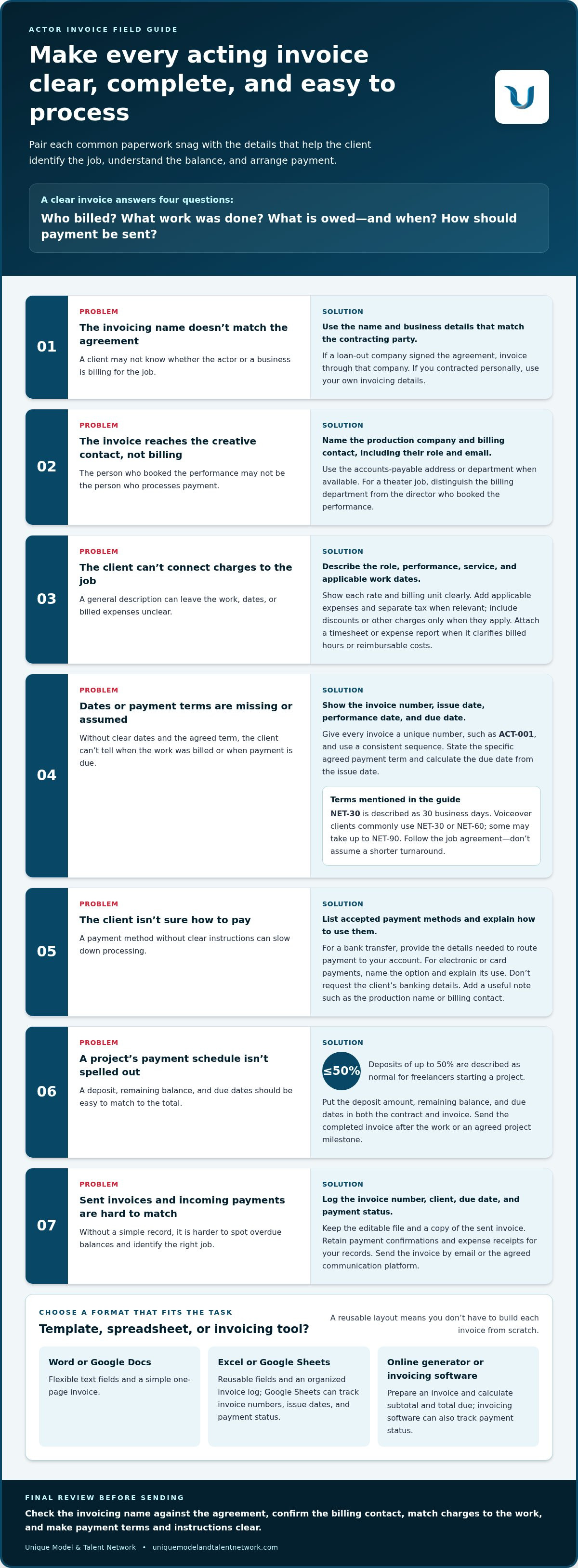
Give each invoice a unique number, such as ACT-001, then use a consistent sequence for later jobs. The number helps you find the matching invoice in your accounting records and distinguish it from other documents. Add the invoice issue date, the date you delivered the work or performed, and the payment due date. These dates show when you billed, what work the charge covers, and when payment is expected.
Set payment terms before sending the invoice, and keep them consistent with the agreement for the job. NET-30 is described as giving a client 30 business days to pay; voiceover clients commonly use NET-30 or NET-60, and some may take up to NET-90. State the specific agreed term and calculate the due date from the issue date. Don’t assume a two-week turnaround if the agreed schedule is Net-60.
List the accepted payment methods and give clear instructions in the invoice notes. For a bank transfer, provide the details needed to route payment to your account. For electronic or card payments, name the payment option and explain how to use it. Don’t request the client’s banking details: they aren’t needed to tell the client where to send payment. Add a brief note with useful job information, such as the production name or billing contact.
Deposits can help establish the payment schedule before work begins. Deposits of up to 50% are described as normal for freelancers starting a project. Put any deposit amount, remaining balance, and due dates in the contract and invoice, so the client can see how each payment relates to the total. Send the completed invoice by email or the agreed communication platform after completing the work or reaching a project milestone.
- Excel or Word: Use an invoice template with preformatted fields when you want a reusable document you can edit for each job.
- Google Sheets: Use a spreadsheet to maintain a simple invoice log alongside invoice numbers, issue dates, and payment status.
- Online invoice generator: Use one to prepare an invoice and calculate its subtotal and total due.
After sending an invoice, record its number, client, due date, and payment status in your accounting log. This simple step helps you spot overdue balances and match incoming payments to the right job.
Actor and client contact details
An actor invoice links a specific performance or service to the person or production company responsible for payment. Use contact details that match the job agreement and give the client a clear route for billing questions and payment processing.
Should you invoice as an individual, sole proprietor, or through a loan-out company? Use the name and business details that match the contracting party and the engagement records. If a loan-out company signed the agreement, list it as the invoicing business. If you contracted personally, use your own invoicing details.
Put your name or business name near the top of the invoice. Add a mailing address and professional email so the production team can identify the sender and respond. Include a phone number if you use it for billing communication. A business logo or signature can also help clients recognize the invoice.
Identify the client by the production company’s name and the billing contact’s name, role, and email. Use the address or department provided for accounts payable when available. For example, an invoice for a theater production should distinguish the theater’s billing department from the director who booked the performance. This helps route the document to accounting without confusing the creative contact with the payer.
Actors use invoices to request payment for their services and related expenses, while keeping a record of completed work. Describe the role, performance, service, and applicable dates so the client can connect each charge to the production. Attach a timesheet or expense report when it clarifies the billed hours or reimbursable costs.
For freelance tax records, keep copies of invoices, payment confirmations, and expense receipts. Show applicable tax information as a separate line when relevant. An invoice doesn’t replace tracking income and expenses. Consistent records make it easier to reconcile payments and prepare accounting summaries.
To create and send an invoice using a template or invoicing software, enter the agreed business and client names, add the service and dates, and review applicable tax details. Save the invoice as a PDF and send it through the client’s preferred platform. Keep the editable file and a copy of the sent invoice with your records.
- Word or Google Docs: Use a document format when you need flexible text fields and a simple one-page invoice.
- Excel or Google Sheets: Use a spreadsheet for reusable fields and organized invoice records.
- Invoicing software: Use it to prepare invoices and track payment status in one workflow.
Choose an actor invoice template with space for both parties’ contact details, service descriptions, applicable tax, and payment records. Before sending, compare the invoicing name with the agreement and confirm the billing contact can route it to accounting.
Business and client contact details
A complete invoice connects the actor, the production, and the person responsible for paying. Put your professional or business name prominently, then add the contact information the client needs for billing questions. Include a mailing address and professional email, plus a phone number if you use it for work communication. If you invoice through a business, use its name consistently with the agreement.
Identify the client precisely. Use the production company’s registered or commonly used business name, plus the billing contact’s name, department, and email. A director may have booked the performance, while accounts payable processes the invoice. Addressing it to the right billing contact helps it reach accounting without relying on the creative team to forward it.
Add a logo or signature if you use one consistently. These details can help the recipient recognize the invoice, especially when it arrives by email. Keep branding modest and leave room for the client’s name, service description, dates, and total. If the production provides a purchase-order number or billing reference, place it near the client details so accounting can match the invoice to its records.
State the payment term agreed for the project and include the due date. Put billing and payment terms in the contract. Late fees aren’t generally standard in most areas of the non-union voiceover industry and may not be enforceable, so don’t add one casually or treat it as automatic.
Send the invoice after completing the work or reaching the agreed project milestone. Use the client’s preferred email or communication platform, attach a readable PDF, and write a short message naming the production and invoice number. Keep the sent email and attachment together; if the client asks for a correction, save the revised version with a clear file name, such as “ActorName_Production_Invoice-004.pdf.”
Before sending, compare the invoice with the estimate and agreement. Confirm the client name, billing email, work description, dates, charges, and any approved expenses. If the production requires a timesheet or expense report, attach it as a separate file and label it with the same invoice number. This provides accounting with supporting detail without crowding the invoice.
- PDF export: Use it to preserve the invoice layout when sending by email.
- Invoice generator: Use it to prepare a consistent invoice and calculate the subtotal and total due.
- Spreadsheet: Use it to track sent invoices, due dates, and payment status.
If you download a template, replace every sample name and contact field before sending. Review the recipient, attachments, and payment instructions to prevent avoidable back-and-forth and keep each job’s records organized.
How do you bill for acting work?
An acting invoice formally requests payment for services and related expenses. It also links the charge to a production, performance, and agreed billing terms. Describe the work specifically so the client can match each line to the booking.
Identify the role or service, production name, and performance or service dates. For example, write “supporting role, filmed performance, production title, performance date” rather than “acting.” For voiceover, identify the session or recording service and any agreed usage rights. Use separate lines when different work types or usage terms have different charges.
How should an actor calculate and list hourly, daily, or project rates? Follow the rate and unit agreed for the job, then show quantity, rate, and line total. These illustrate formats, not universal rate recommendations.
What are standard acting fees and union minimum rates in the United States? There is no single fee that applies to every acting job, and the provided facts contain no current union minimum figure. Rates depend on the work and its agreed terms, so list the applicable contract or booking rate rather than presenting an example as a standard.
Voiceover work may separate session time, recording, editing, and usage. List the covered service and usage period on distinct lines when they were agreed separately. For hourly work, multiply the agreed rate by the hours. For a flat project fee, identify the deliverable covered by the total.
How do actors add expenses, reimbursements, and receipts to an invoice? List approved expenses as separate lines, name their purpose, and attach receipts or an expense report. A per diem is a daily allowance for expenses while working on location. Actors may also list rehearsal fees when rehearsals are separate from the main performance, or agent commission as a deduction from earnings.
For production costs, distinguish acting compensation from approved wardrobe, makeup, or other charges. Attach a timesheet when billing hours, and label supporting documents with the invoice number. This lets the client trace each charge to its service without hiding expenses in a combined total.
- Calculator: Check quantities multiplied by rates and confirm the invoice total.
- Spreadsheet: Compare line items, expenses, deductions, and totals in one working document.
- Invoice generator: Enter services and charges, then use its subtotal and total calculations to review the bill.
Choosing an invoice template or creating an invoice from scratch
A ready-made template offers a structured starting point, while a custom invoice lets you shape the layout around your work. Choose based on the charges you need to show, the client’s billing process, and how often you invoice. A voice actor billing for recording and usage may need separate lines, while a performer charging one flat project rate may need a simpler format.
Actor invoice templates are available in Excel and Word, with preformatted fields to streamline billing. A template can include spaces for business and client details, service descriptions, dates, charges, and totals. Some also separate labor and materials, making it easier to distinguish performance work from approved production expenses.
Review every field before using a downloaded template. Remove sample names, placeholder amounts, and instructions that don’t apply to your job. Check that the layout accommodates the agreed service, billing unit, applicable tax information, and payment terms. Save a clean master copy, then create a new file for each production instead of overwriting an earlier invoice.
Manual invoices work well for a straightforward charge when you want control over the formatting. Create the document in Word or Google Docs, then export it as a PDF to preserve the layout. A spreadsheet in Excel or Google Sheets suits actors who want to calculate line totals and maintain an invoice log in the same file.
Build an invoice from scratch if a template makes you omit relevant details or includes sections you never use. Start with a readable page, then arrange the information in a clear order: sender, client, invoice identifiers and dates, service lines, applicable charges or deductions, and amount due. Use direct labels such as “performance date” or “rehearsal fee.”
- Word or Google Docs: Use a document editor for flexible descriptions and a polished, printable professional invoice.
- Excel or Google Sheets: Use a spreadsheet when billed work has multiple line items or needs a running record.
- Invoice generator: Use one to enter charges and calculate subtotals and the total due.
Whichever format you choose, test it with a completed job before making it your standard. Confirm that long production names fit, totals remain visible, and the saved PDF is readable. Keep the original template separate from completed invoices, and use a consistent file-naming pattern to make past jobs easy to find.
Templates save setup time, but they don’t replace a final review. Compare each invoice with the booking agreement, remove irrelevant fields, and make sure every billed item is clear to the production’s accounting team.
Unique Model & Talent Network: The Network Membership
Unique Model & Talent Network gives actors a professional community alongside the practical business habits that support a career. The Network Membership connects aspiring actors with industry experts, while Live Industry Workshops and Industry Expert Q&A Sessions help members build industry knowledge.
If you’re refining your professional materials, Portfolio & Reel Reviews offer focused feedback, and Monthly Skill-Building Challenges provide structured ways to keep developing your craft. These resources complement the administrative work of tracking invoices and communicating clearly with production teams. They’re useful when you want industry guidance and peer connections as you plan your next steps.
Explore the Network Membership and its actor-development resources by visiting Unique Model & Talent Network.
Build the Business Side of Your Acting Career
A reliable invoicing routine is one part of developing a sustainable acting career. Keep building the industry knowledge, materials, and professional connections that support your work. As you put what you’ve learned about creating invoices for acting work into practice, consider where focused guidance could help you grow beyond the paperwork.
Unique Model & Talent Network offers The Network Membership, Live Industry Workshops, and Portfolio & Reel Reviews. These opportunities support actors seeking industry insight, practical learning, and constructive feedback on their professional materials. Choose the support that fits your current goals, whether you’re strengthening your reel or looking for a community with industry perspectives.
Take your next career-development step by exploring Unique Model & Talent Network. Keep sharpening your craft and business habits, one deliberate move at a time.
Frequently Asked Questions
Can I charge late fees?
Possibly, but agree on late-fee terms before billing and include them in the contract. Late fees are generally not standard in most areas of the non-union voiceover industry and may not be enforceable. Don’t assume that adding a fee to an invoice makes it collectible. If the production’s payment schedule is already agreed, follow up professionally and document the outstanding balance rather than surprising the client with a new charge.
Can I create my own invoice manually rather than using a service?
Yes. Create an invoice in a document editor or spreadsheet, save a copy for your records, and send a readable version to the production. For example, a manually prepared invoice can work well for a single theater engagement with one agreed service charge. Use a consistent layout and file-naming system, and check the arithmetic before sending. Invoicing software is optional, not a prerequisite for requesting payment.
How can I help ensure that my client will pay on time?
Make the payment process easy to follow before the job wraps. Confirm the accounts-payable contact, any purchase-order reference, and the required submission channel with the production team. Send the invoice promptly after the agreed milestone, with supporting paperwork in the requested format. If payment is late, reply to the original email thread with the invoice number and a concise request for a status update. Keep each reminder and response with your payment records.
What information should an acting invoice include?
Include enough detail for the recipient to identify the booking and process payment: your invoicing name, client or production name, invoice identifier, relevant dates, service description, charges, and payment instructions. Add applicable tax information, discounts, expenses, or deductions as separate entries. For example, identify a voiceover session by project and session date rather than labeling it only “acting.” Keep the description consistent with the booking paperwork so accounting can reconcile the charge.
How do actors format an invoice for film, TV, or theater work?
Adapt the service description to the production. For film, identify the project, role, and applicable shoot dates. For television, include the program or campaign and distinguish performance work from separately agreed usage. For theater, specify the production and performance dates or run covered by the bill. Put different services on separate lines. This helps the production’s accounting team connect the invoice to its records.
How should actors invoice for overtime, rehearsals, fittings, travel, and per diem?
List each item separately and bill it according to the project’s agreed terms. For overtime, show the additional time and applicable rate; for rehearsals or fittings, identify the date and service. Describe travel costs by purpose and attach receipts or an expense report when available. A per diem is a daily allowance for expenses while working on location. Keep supporting documents organized with the related production invoice.
What tax information and forms do U.S. actors need when invoicing?
Show applicable tax information on the invoice, but handle tax paperwork separately as part of the production’s onboarding or accounting process. The documents requested can depend on whether you contracted personally, through a business, or through a loan-out company. Send requested tax documents directly to the appropriate production contact, and avoid putting sensitive identifying details in ordinary invoice notes. Keep copies of invoices, payment records, and expense receipts for your tax preparation.


